Getting started: building a service (Preview)
This guide walks you through the process of creating an AI Optimization service.
With this approach, you define your planning model: the domain objects, constraints, and planning solution. Timefold Solver takes care of the rest. There is no need to wire up a solver manually, manage thread pools, or implement REST endpoints by hand. The service exposes a ready-to-use REST API automatically and supports our recommended optimization architecture.
| The service approach is currently only available in Java. |
| The service approach is currently in preview. |
What you will build
You will build an optimization solution that runs locally on your machine, and optimizes a school timetable for students and teachers.
Your application will assign Lessons to Timeslots and Rooms automatically
by using AI to adhere to hard and soft scheduling constraints, for example:
-
A room can have at most one lesson at the same time.
-
A teacher can teach at most one lesson at the same time.
-
A student can attend at most one lesson at the same time.
-
A teacher prefers to teach all lessons in the same room.
-
A teacher prefers to teach sequential lessons and dislikes gaps between lessons.
-
A student dislikes sequential lessons on the same subject.
Mathematically speaking, school timetabling is an NP-hard problem. This means it is difficult to scale. Simply brute force iterating through all possible combinations takes millions of years for a non-trivial dataset, even on a supercomputer.
Fortunately, AI constraint solvers such as Timefold Solver have advanced algorithms that deliver a near-optimal solution in a reasonable amount of time.
Solution source code
In case you get stuck during this Getting Started guide, it might be worth checking the solution project. This solution can be found on GitHub.
Prerequisites
To complete this guide, you need:
-
Tools
-
21 or higher
-
Maven
-
An IDE of your choice (IntelliJ IDEA, VSCode, …)
-
-
Knowledge
-
Java (Basic)
-
Quarkus (Basic)
-
1. The build file and the dependencies
Create a Maven file and add these dependencies:
-
Maven
Your pom.xml file has the following content:
<project xmlns="http://maven.apache.org/POM/4.0.0" xmlns:xsi="http://www.w3.org/2001/XMLSchema-instance"
         xsi:schemaLocation="http://maven.apache.org/POM/4.0.0 https://maven.apache.org/xsd/maven-4.0.0.xsd">
  <parent>
    <groupId>ai.timefold.sdk</groupId>
    <artifactId>timefold-sdk-model-parent</artifactId>
    <version>{timefold-sdk-version}</version>
  </parent>

  <modelVersion>4.0.0</modelVersion>
  <groupId>org.acme</groupId>
  <artifactId>schooltimetabling</artifactId>
  <version>${revision}</version>
  <name>School Timetabling</name>
  <description>Solution for the Timefold Service getting started example</description>

  <properties>
    <revision>1.0.0-SNAPSHOT</revision>
    <version.ai.timefold.sdk>{timefold-sdk-version}</version.ai.timefold.sdk>
  </properties>

  <dependencies>
    <dependency>
      <groupId>ai.timefold.sdk.enterprise</groupId>
      <artifactId>timefold-sdk-enterprise</artifactId>
    </dependency>
  </dependencies>

</project>
2. Model the domain objects
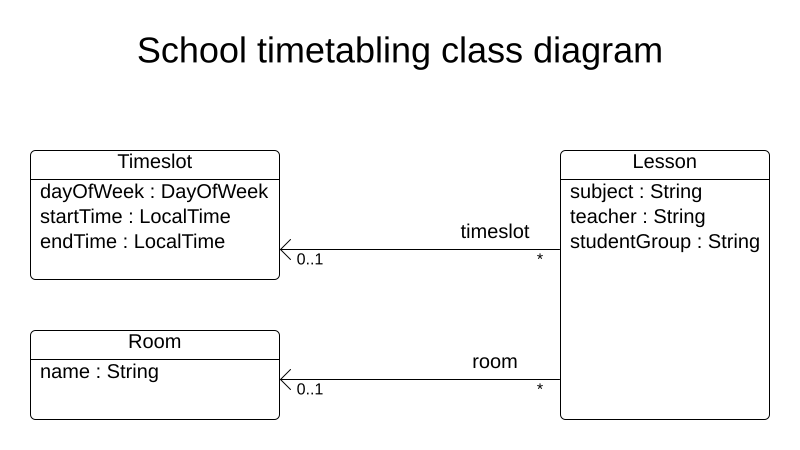
Your goal is to assign each lesson to a time slot and a room. You will create these classes:
2.1. Timeslot
The Timeslot class represents a time interval when lessons are taught,
for example, Monday 10:30 - 11:30 or Tuesday 13:30 - 14:30.
For simplicity’s sake, all time slots have the same duration
and there are no time slots during lunch or other breaks.
A time slot has no date, because in this example, the high school schedule just repeats every week.
-
Java
-
Kotlin
Create the src/main/java/org/acme/schooltimetabling/domain/Timeslot.java class:
package org.acme.schooltimetabling.domain;

import java.time.DayOfWeek;
import java.time.LocalTime;

public class Timeslot {

    private DayOfWeek dayOfWeek;
    private LocalTime startTime;
    private LocalTime endTime;

    public Timeslot() {
    }

    public Timeslot(DayOfWeek dayOfWeek, LocalTime startTime, LocalTime endTime) {
        this.dayOfWeek = dayOfWeek;
        this.startTime = startTime;
        this.endTime = endTime;
    }

    public DayOfWeek getDayOfWeek() {
        return dayOfWeek;
    }

    public LocalTime getStartTime() {
        return startTime;
    }

    public LocalTime getEndTime() {
        return endTime;
    }

    @Override
    public String toString() {
        return dayOfWeek + " " + startTime;
    }

}
Create the src/main/kotlin/org/acme/schooltimetabling/domain/Timeslot.kt class:
package org.acme.schooltimetabling.domain

import java.time.DayOfWeek
import java.time.LocalTime

data class Timeslot(
    val dayOfWeek: DayOfWeek,
    val startTime: LocalTime,
    val endTime: LocalTime) {

    override fun toString(): String = "$dayOfWeek $startTime"

}
Because no Timeslot instances change during solving, a Timeslot is called a problem fact.
Such classes do not require any Timefold Solver specific annotations.
Notice the toString() method keeps the output short,
so it is easier to read Timefold Solver’s DEBUG or TRACE log, as shown later.
2.2. Room
The Room record represents a location where lessons are taught,
for example, Room A or Room B.
For simplicity’s sake, all rooms are without capacity limits
and they can accommodate all lessons.
-
Java
-
Kotlin
Create the src/main/java/org/acme/schooltimetabling/domain/Room.java class:
package org.acme.schooltimetabling.domain;

public record Room(String name) { }
Create the src/main/kotlin/org/acme/schooltimetabling/domain/Room.kt class:
package org.acme.schooltimetabling.domain

data class Room(
    val name: String) {

    override fun toString(): String = name

}
Room instances do not change during solving, so Room is also a problem fact.
2.3. Lesson
During a lesson, represented by the Lesson class,
a teacher teaches a subject to a group of students,
for example, Math by A.Turing for 9th grade or Chemistry by M.Curie for 10th grade.
If a subject is taught multiple times per week by the same teacher to the same student group,
there are multiple Lesson instances that are only distinguishable by id.
For example, the 9th grade has six math lessons a week.
During solving, Timefold Solver changes the timeslot and room fields of the Lesson class,
to assign each lesson to a time slot and a room.
Because Timefold Solver changes these fields, Lesson is a planning entity:
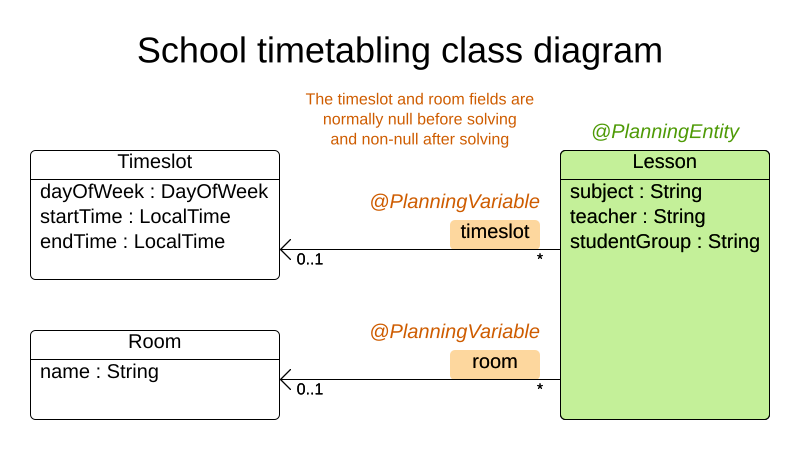
Most of the fields in the previous diagram contain input data, except for the orange fields:
A lesson’s timeslot and room fields are unassigned (null) in the input data
and assigned (not null) in the output data.
Timefold Solver changes these fields during solving.
Such fields are called planning variables.
In order for Timefold Solver to recognize them,
both the timeslot and room fields require an @PlanningVariable annotation.
Their containing class, Lesson, requires an @PlanningEntity annotation.
-
Java
-
Kotlin
Create the src/main/java/org/acme/schooltimetabling/domain/Lesson.java class:
package org.acme.schooltimetabling.domain;

import ai.timefold.solver.core.api.domain.entity.PlanningEntity;
import ai.timefold.solver.core.api.domain.entity.PlanningId;
import ai.timefold.solver.core.api.domain.variable.PlanningVariable;

@PlanningEntity
public class Lesson {

    @PlanningId
    private String id;

    private String subject;
    private String teacher;
    private String studentGroup;

    @PlanningVariable
    private Timeslot timeslot;
    @PlanningVariable
    private Room room;

    public Lesson() {
    }

    public Lesson(String id, String subject, String teacher, String studentGroup) {
        this.id = id;
        this.subject = subject;
        this.teacher = teacher;
        this.studentGroup = studentGroup;
    }

    // This constructor is only for tests
    Lesson(String id, String subject, String teacher, String studentGroup, Timeslot timeslot, Room room) {
        this(id, subject, teacher, studentGroup);
        this.timeslot = timeslot;
        this.room = room;
    }

    public String getId() {
        return id;
    }

    public String getSubject() {
        return subject;
    }

    public String getTeacher() {
        return teacher;
    }

    public String getStudentGroup() {
        return studentGroup;
    }

    public Timeslot getTimeslot() {
        return timeslot;
    }

    public void setTimeslot(Timeslot timeslot) {
        this.timeslot = timeslot;
    }

    public Room getRoom() {
        return room;
    }

    public void setRoom(Room room) {
        this.room = room;
    }

    @Override
    public String toString() {
        return subject + "(" + id + ")";
    }

}
Create the src/main/kotlin/org/acme/schooltimetabling/domain/Lesson.kt class:
package org.acme.schooltimetabling.domain

import ai.timefold.solver.core.api.domain.entity.PlanningEntity
import ai.timefold.solver.core.api.domain.entity.PlanningId
import ai.timefold.solver.core.api.domain.variable.PlanningVariable

@PlanningEntity
data class Lesson (
    @PlanningId
    val id: String,
    val subject: String,
    val teacher: String,
    val studentGroup: String) {

    @PlanningVariable
    var timeslot: Timeslot? = null

    @PlanningVariable
    var room: Room? = null

    // No-arg constructor required for Timefold
    constructor() : this("0", "", "", "")

    override fun toString(): String = "$subject($id)"

}
The Lesson class has an @PlanningEntity annotation,
so Timefold Solver knows that this class changes during solving
because it contains one or more planning variables.
The timeslot field has an @PlanningVariable annotation,
so Timefold Solver knows that it can change its value.
In order to find potential Timeslot instances to assign to this field,
Timefold Solver uses the variable type to connect to a value range provider
that provides a List<Timeslot> to pick from.
The room field also has an @PlanningVariable annotation, for the same reasons.
|
Determining the |
3. Define the constraints and calculate the score
A score represents the quality of a specific solution. The higher the better. Timefold Solver looks for the best solution, which is the solution with the highest score found in the available time. It might be the optimal solution.
Because this use case has hard and soft constraints,
use the HardSoftScore class to represent the score:
-
Hard constraints must not be broken. For example: A room can have at most one lesson at the same time.
-
Soft constraints should not be broken. For example: A teacher prefers to teach in a single room.
Hard constraints are weighted against other hard constraints. Soft constraints are weighted too, against other soft constraints. Hard constraints always outweigh soft constraints, regardless of their respective weights.
To calculate the score, implement a TimetableConstraintProvider class.
It uses Timefold Solver’s Constraint Streams API
which is inspired by Java Streams and SQL:
-
Java
-
Kotlin
Create a src/main/java/org/acme/schooltimetabling/solver/TimetableConstraintProvider.java class:
package org.acme.schooltimetabling.solver;

import org.acme.schooltimetabling.domain.Lesson;
import ai.timefold.solver.core.api.score.HardSoftScore;
import ai.timefold.solver.core.api.score.stream.Constraint;
import ai.timefold.solver.core.api.score.stream.ConstraintFactory;
import ai.timefold.solver.core.api.score.stream.ConstraintProvider;
import ai.timefold.solver.core.api.score.stream.Joiners;

public class TimetableConstraintProvider implements ConstraintProvider {

    @Override
    public Constraint[] defineConstraints(ConstraintFactory constraintFactory) {
        return new Constraint[] {
                // Hard constraints
                roomConflict(constraintFactory),
                teacherConflict(constraintFactory),
                studentGroupConflict(constraintFactory),
                // Soft constraints are only implemented in the timefold-quickstarts code
        };
    }

    Constraint roomConflict(ConstraintFactory constraintFactory) {
        // A room can accommodate at most one lesson at the same time.
        return constraintFactory
                // Select each pair of 2 different lessons ...
                .forEachUniquePair(Lesson.class,
                        // ... in the same timeslot ...
                        Joiners.equal(Lesson::getTimeslot),
                        // ... in the same room ...
                        Joiners.equal(Lesson::getRoom))
                // ... and penalize each pair with a hard weight.
                .penalize(HardSoftScore.ONE_HARD)
                .asConstraint("Room conflict");
    }

    Constraint teacherConflict(ConstraintFactory constraintFactory) {
        // A teacher can teach at most one lesson at the same time.
        return constraintFactory
                .forEachUniquePair(Lesson.class,
                        Joiners.equal(Lesson::getTimeslot),
                        Joiners.equal(Lesson::getTeacher))
                .penalize(HardSoftScore.ONE_HARD)
                .asConstraint("Teacher conflict");
    }

    Constraint studentGroupConflict(ConstraintFactory constraintFactory) {
        // A student can attend at most one lesson at the same time.
        return constraintFactory
                .forEachUniquePair(Lesson.class,
                        Joiners.equal(Lesson::getTimeslot),
                        Joiners.equal(Lesson::getStudentGroup))
                .penalize(HardSoftScore.ONE_HARD)
                .asConstraint("Student group conflict");
    }

}
Create a src/main/kotlin/org/acme/schooltimetabling/solver/TimetableConstraintProvider.kt class:
package org.acme.kotlin.schooltimetabling.solver

import ai.timefold.solver.core.api.score.HardSoftScore
import ai.timefold.solver.core.api.score.stream.Constraint
import ai.timefold.solver.core.api.score.stream.ConstraintFactory
import ai.timefold.solver.core.api.score.stream.ConstraintProvider
import ai.timefold.solver.core.api.score.stream.Joiners
import org.acme.kotlin.schooltimetabling.domain.Lesson
import org.acme.kotlin.schooltimetabling.solver.justifications.*
import java.time.Duration

class TimeTableConstraintProvider : ConstraintProvider {

    override fun defineConstraints(constraintFactory: ConstraintFactory): Array<Constraint> {
        return arrayOf(
            // Hard constraints
            roomConflict(constraintFactory),
            teacherConflict(constraintFactory),
            studentGroupConflict(constraintFactory),
            // Soft constraints
            teacherRoomStability(constraintFactory),
            teacherTimeEfficiency(constraintFactory),
            studentGroupSubjectVariety(constraintFactory)
        )
    }

    fun roomConflict(constraintFactory: ConstraintFactory): Constraint {
        // A room can accommodate at most one lesson at the same time.
        return constraintFactory
            // Select each pair of 2 different lessons ...
            .forEachUniquePair(
                Lesson::class.java,
                // ... in the same timeslot ...
                Joiners.equal(Lesson::timeslot),
                // ... in the same room ...
                Joiners.equal(Lesson::room)
            )
            // ... and penalize each pair with a hard weight.
            .penalize(HardSoftScore.ONE_HARD)
            .justifyWith { lesson1: Lesson, lesson2: Lesson, _ ->
                RoomConflictJustification(lesson1.room, lesson1,lesson2)}
            .asConstraint("Room conflict")
    }

    fun teacherConflict(constraintFactory: ConstraintFactory): Constraint {
        // A teacher can teach at most one lesson at the same time.
        return constraintFactory
            .forEachUniquePair(
                Lesson::class.java,
                Joiners.equal(Lesson::timeslot),
                Joiners.equal(Lesson::teacher)
            )
            .penalize(HardSoftScore.ONE_HARD)
            .justifyWith { lesson1: Lesson, lesson2: Lesson, _ ->
                TeacherConflictJustification(lesson1.teacher, lesson1, lesson2)}
            .asConstraint("Teacher conflict")
    }

    fun studentGroupConflict(constraintFactory: ConstraintFactory): Constraint {
        // A student can attend at most one lesson at the same time.
        return constraintFactory
            .forEachUniquePair(
                Lesson::class.java,
                Joiners.equal(Lesson::timeslot),
                Joiners.equal(Lesson::studentGroup)
            )
            .penalize(HardSoftScore.ONE_HARD)
            .justifyWith { lesson1: Lesson, lesson2: Lesson, _ ->
                StudentGroupConflictJustification(lesson1.studentGroup, lesson1, lesson2)}
            .asConstraint("Student group conflict")
    }

    fun teacherRoomStability(constraintFactory: ConstraintFactory): Constraint {
        // A teacher prefers to teach in a single room.
        return constraintFactory
            .forEachUniquePair(
                Lesson::class.java,
                Joiners.equal(Lesson::teacher)
            )
            .filter { lesson1: Lesson, lesson2: Lesson -> lesson1.room !== lesson2.room }
            .penalize(HardSoftScore.ONE_SOFT)
            .justifyWith { lesson1: Lesson, lesson2: Lesson, _ ->
                TeacherRoomStabilityJustification(lesson1.teacher, lesson1, lesson2)}
            .asConstraint("Teacher room stability")
    }

    fun teacherTimeEfficiency(constraintFactory: ConstraintFactory): Constraint {
        // A teacher prefers to teach sequential lessons and dislikes gaps between lessons.
        return constraintFactory
            .forEach(Lesson::class.java)
            .join(Lesson::class.java,
                Joiners.equal(Lesson::teacher),
                Joiners.equal { lesson: Lesson -> lesson.timeslot?.dayOfWeek })
            .filter { lesson1: Lesson, lesson2: Lesson ->
                val between = Duration.between(
                    lesson1.timeslot?.endTime,
                    lesson2.timeslot?.startTime
                )
                !between.isNegative && between <= Duration.ofMinutes(30)
            }
            .reward(HardSoftScore.ONE_SOFT)
            .justifyWith{ lesson1: Lesson, lesson2: Lesson, _ ->
                TeacherTimeEfficiencyJustification(lesson1.teacher, lesson1, lesson2)}
            .asConstraint("Teacher time efficiency")
    }

    fun studentGroupSubjectVariety(constraintFactory: ConstraintFactory): Constraint {
        // A student group dislikes sequential lessons on the same subject.
        return constraintFactory
            .forEach(Lesson::class.java)
            .join(Lesson::class.java,
                Joiners.equal(Lesson::subject),
                Joiners.equal(Lesson::studentGroup),
                Joiners.equal { lesson: Lesson -> lesson.timeslot?.dayOfWeek })
            .filter { lesson1: Lesson, lesson2: Lesson ->
                val between = Duration.between(
                    lesson1.timeslot?.endTime,
                    lesson2.timeslot?.startTime
                )
                !between.isNegative && between <= Duration.ofMinutes(30)
            }
            .penalize(HardSoftScore.ONE_SOFT)
            .justifyWith { lesson1: Lesson, lesson2: Lesson, _ ->
                StudentGroupSubjectVarietyJustification(lesson1.studentGroup, lesson1, lesson2)}
            .asConstraint("Student group subject variety")
    }

}
The ConstraintProvider scales an order of magnitude better than the EasyScoreCalculator: O(n) instead of O(n²).
4. Gather the domain objects in a planning solution
A Timetable wraps all Timeslot, Room, and Lesson instances of a single dataset.
Furthermore, because it contains all lessons, each with a specific planning variable state,
it is known as a planning solution.
Extending AbstractSimpleModel:
-
Configures this class to be (de-)serialized as part of the
ModelInputandModelOutputof the REST API. -
Implements the
SolverModelinterface using the default HardMediumSoftLongScore.
| It’s ok if you are not familiar with these terms yet. We’ll get to them later. |
-
Java
Create the src/main/java/org/acme/schooltimetabling/domain/Timetable.java class:
package org.acme.schooltimetabling.domain;

import java.util.List;

import ai.timefold.sdk.core.api.AbstractSimpleModel;
import ai.timefold.solver.core.api.domain.solution.PlanningEntityCollectionProperty;
import ai.timefold.solver.core.api.domain.solution.PlanningScore;
import ai.timefold.solver.core.api.domain.solution.PlanningSolution;
import ai.timefold.solver.core.api.domain.solution.ProblemFactCollectionProperty;
import ai.timefold.solver.core.api.domain.valuerange.ValueRangeProvider;

@PlanningSolution
public class Timetable extends AbstractSimpleModel {

    @ValueRangeProvider
    @ProblemFactCollectionProperty
    private List<Timeslot> timeslots;
    @ValueRangeProvider
    @ProblemFactCollectionProperty
    private List<Room> rooms;
    @PlanningEntityCollectionProperty
    private List<Lesson> lessons;

    public Timetable() {
    }

    public Timetable(List<Timeslot> timeslots, List<Room> rooms, List<Lesson> lessons) {
        this.timeslots = timeslots;
        this.rooms = rooms;
        this.lessons = lessons;
    }

    public List<Timeslot> getTimeslots() {
        return timeslots;
    }

    public List<Room> getRooms() {
        return rooms;
    }

    public List<Lesson> getLessons() {
        return lessons;
    }
}
The Timetable class has an @PlanningSolution annotation,
so Timefold Solver knows that this class contains all of the input and output data.
Specifically, these classes are the input of the problem:
-
The
timeslotsfield with all time slots-
This is a list of problem facts, because they do not change during solving.
-
-
The
roomsfield with all rooms-
This is a list of problem facts, because they do not change during solving.
-
-
The
lessonsfield with all lessons-
This is a list of planning entities, because they change during solving.
-
Of each
Lesson:-
The values of the
timeslotandroomfields are typically stillnull, so unassigned. They are planning variables. -
The other fields, such as
subject,teacherandstudentGroup, are filled in. These fields are problem properties.
-
-
However, this class is also the output of the solution:
-
The
lessonsfield for which eachLessoninstance has non-nulltimeslotandroomfields after solving.
5. The value range providers
The timeslots field is a value range provider.
It holds the Timeslot instances which Timefold Solver can pick from to assign to the timeslot field of Lesson instances.
The timeslots field has an @ValueRangeProvider annotation to connect the @PlanningVariable with the @ValueRangeProvider,
by matching the type of the planning variable with the type returned by the value range provider.
Following the same logic, the rooms field also has an @ValueRangeProvider annotation.
6. The problem fact and planning entity properties
Furthermore, Timefold Solver needs to know which Lesson instances it can change
as well as how to retrieve the Timeslot and Room instances used for score calculation
by your TimetableConstraintProvider.
The timeslots and rooms fields have an @ProblemFactCollectionProperty annotation,
so your TimetableConstraintProvider can select from those instances.
The lessons has an @PlanningEntityCollectionProperty annotation,
so Timefold Solver can change them during solving
and your TimetableConstraintProvider can select from those too.
7. Add the Solver Configuration
| TODO: CHECK IF STILL THE CASE This will be replaced in the near future so this configuration will no longer be explicitly needed. |
At time of writing, the application will not start without explicitly configuring the solver spent limit.
This should be configured in a src/main/resources/application.properties file.
ai.timefold.platform.termination.spent-limit=PT30SThis sets up the maximum time the solver will run to be 30 seconds by default, which is enough for this guide. Detailed instruction on how to set this up more correctly will be found in the solver part of the documentation.
8. REST API
The standard way to interact with the optimization service is through a REST API.
Using the service module, most of the REST Endpoints will be automatically generated thanks to the use of the ModelInput, ModelOutput and SolverModel interfaces.
You didn’t have to implement those interfaces in this guide, because they were already implemented for you in the AbstractSimpleModel.
To configure the REST API, you need to provide an interface which extends the ModelRest interface.
-
Java
Create the src/main/java/org/acme/schooltimetabling/rest/TimetableResource.java class:
package org.acme.schooltimetabling.rest;

import jakarta.ws.rs.Path;
import ai.timefold.sdk.rest.api.ModelRest;

@Path("/v1/timetables")
public interface TimetableResource extends ModelRest {
}
This is the most basic version of the interface. The SDK will automatically create multiple REST API endpoints for optimization actions.
The @Path annotation is used to configure the base path of all those endpoints.
9. Running and manually testing the model
Everything is now configured to run the model.
Start the model in development mode by executing:
mvn quarkus:devYou should see the following line in the log on successful start
getting-started-school-timetabling <version> on JVM (powered by Quarkus 3.21.4) started in 1.552s. Listening on: http://localhost:8080Open the Swagger OpenAPI Viewer to inspect the generated API Endpoints: http://localhost:8080/q/swagger-ui/
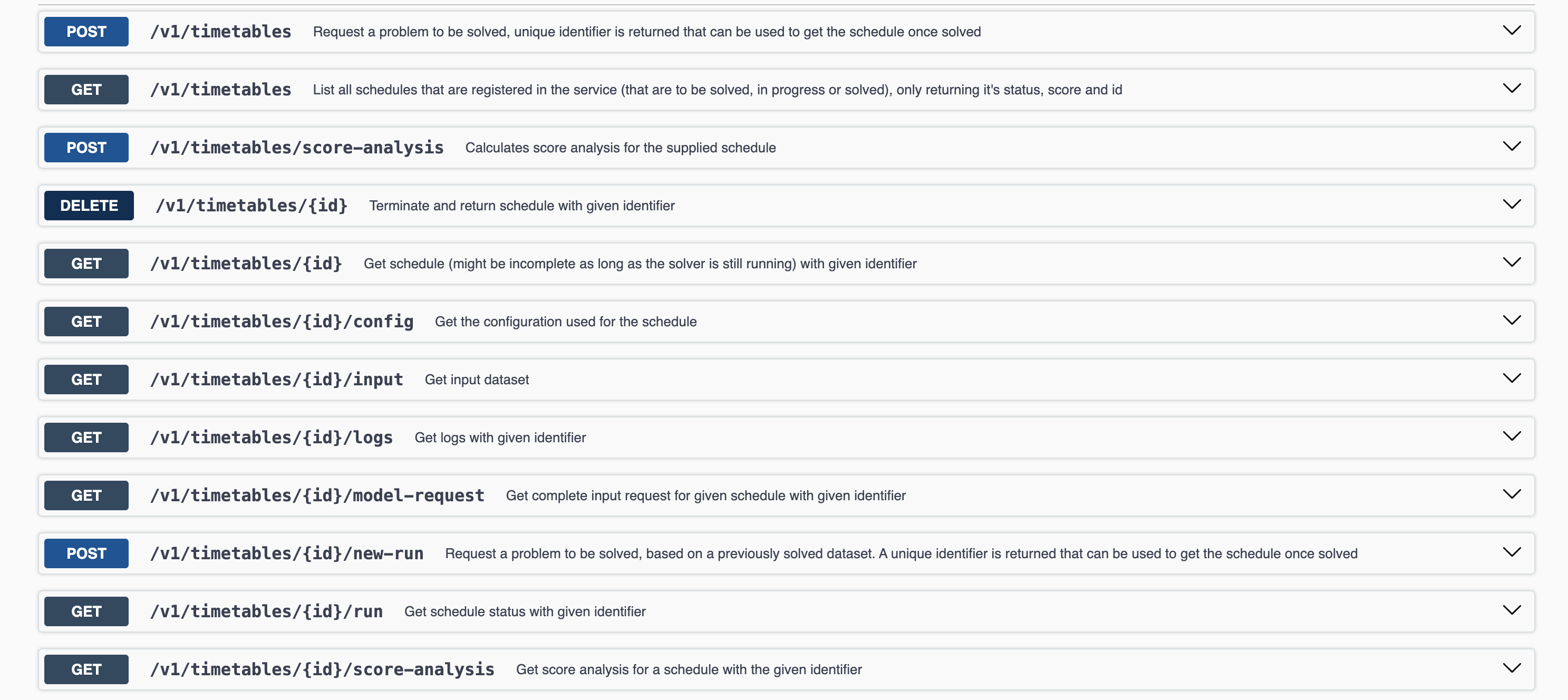
As shown in the image above, just by extending the ModelRest interface, quite a few endpoints were automatically generated.
We discuss these in more depth in the REST API section.
To showcase that the model is now ready for use we only need 2 of those endpoints:
-
POST /v1/timetables: To request a problem to be solved. This returns a unique identifier which can be used to request the resulting schedule. -
GET /v1/timetables/{id}: Get the calculated schedule with the given identifier.
9.1. Sending the problem
curl -X 'POST' \
  'http://localhost:8080/v1/timetables' \
  -H 'accept: application/json' \
  -H 'Content-Type: application/json' \
  -d '{
  "config": {
    "run": {
      "termination": {
        "spentLimit": "PT10S"
      }
    }
  },
  "modelInput": {
    "timeslots": [
      {
        "dayOfWeek": "MONDAY",
        "startTime": "13:45:30.123456789",
        "endTime": "13:45:30.123456789"
      }
    ],
    "rooms": [
      {
        "name": "Room1"
      }
    ],
    "lessons": [
      {
        "id": "Lesson1",
        "subject": "English",
        "teacher": "Mrs. Joos",
        "studentGroup": "1st Grade"
      }
    ]
  }
}'
This call should return a response containing the ID of the started run.
{
  "id" : "f401a609-403b-48c4-9487-0baf287e4f72",
  "name" : "Dataset-2025-06-10T13:03:50.824454+02:00",
  "submitDateTime" : "2025-06-10T13:03:50.824454+02:00",
  "solverStatus" : "NOT_SOLVING"
}
9.2. Getting the solution
Using the ID received in the previous run, the current status of the run can be retrieved.
curl -X 'GET' \
  'http://localhost:8080/v1/timetables/{id}' \
  -H 'accept: application/json'
This call with return the standard response structure.
{
  "metadata": {
    "id": "f401a609-403b-48c4-9487-0baf287e4f72",
    "name": "Dataset-2025-06-10T13:03:50.824454+02:00",
    "submitDateTime": "2025-06-10T13:03:50.824454+02:00",
    "startDateTime": "2025-06-10T13:03:50.832544+02:00",
    "activeDateTime": "2025-06-10T13:03:50.833934+02:00",
    "completeDateTime": "2025-06-10T13:03:50.843229+02:00",
    "shutdownDateTime": "2025-06-10T13:03:50.844522+02:00",
    "solverStatus": "SOLVING_COMPLETED",
    "score": "0hard/0medium/0soft",
    "validationResult": {
      "summary": "VALIDATION_NOT_SUPPORTED"
    }
  },
  "modelOutput": {
    "timeslots": [
      {
        "dayOfWeek": "MONDAY",
        "startTime": "13:45:30.123456789",
        "endTime": "13:45:30.123456789"
      }
    ],
    "rooms": [
      {
        "name": "Room1"
      }
    ],
    "lessons": [
      {
        "id": "Lesson1",
        "subject": "English",
        "teacher": "Mrs. Joos",
        "studentGroup": "1st Grade",
        "timeslot": {
          "dayOfWeek": "MONDAY",
          "startTime": "13:45:30.123456789",
          "endTime": "13:45:30.123456789"
        },
        "room": {
          "name": "Room1"
        }
      }
    ]
  }
}
Important elements to observe in the JSON above:
-
The
Lessonobject now has an assignedRoomandTimeslot. -
The
solverStatusisSOLVING_COMPLETED, indicating the solver has finished optimizing. -
The
scoreis0hard/0medium/0soft, signaling that no constraints were broken.
Next
Since this is a "Getting Started" guide, not everything is covered yet.
-
Learn about improvements you can make to your model:
-
How to set up the underlying Timefold Constraint Solver.
-
How to configure your REST API with validations, custom endpoints, etc.
-